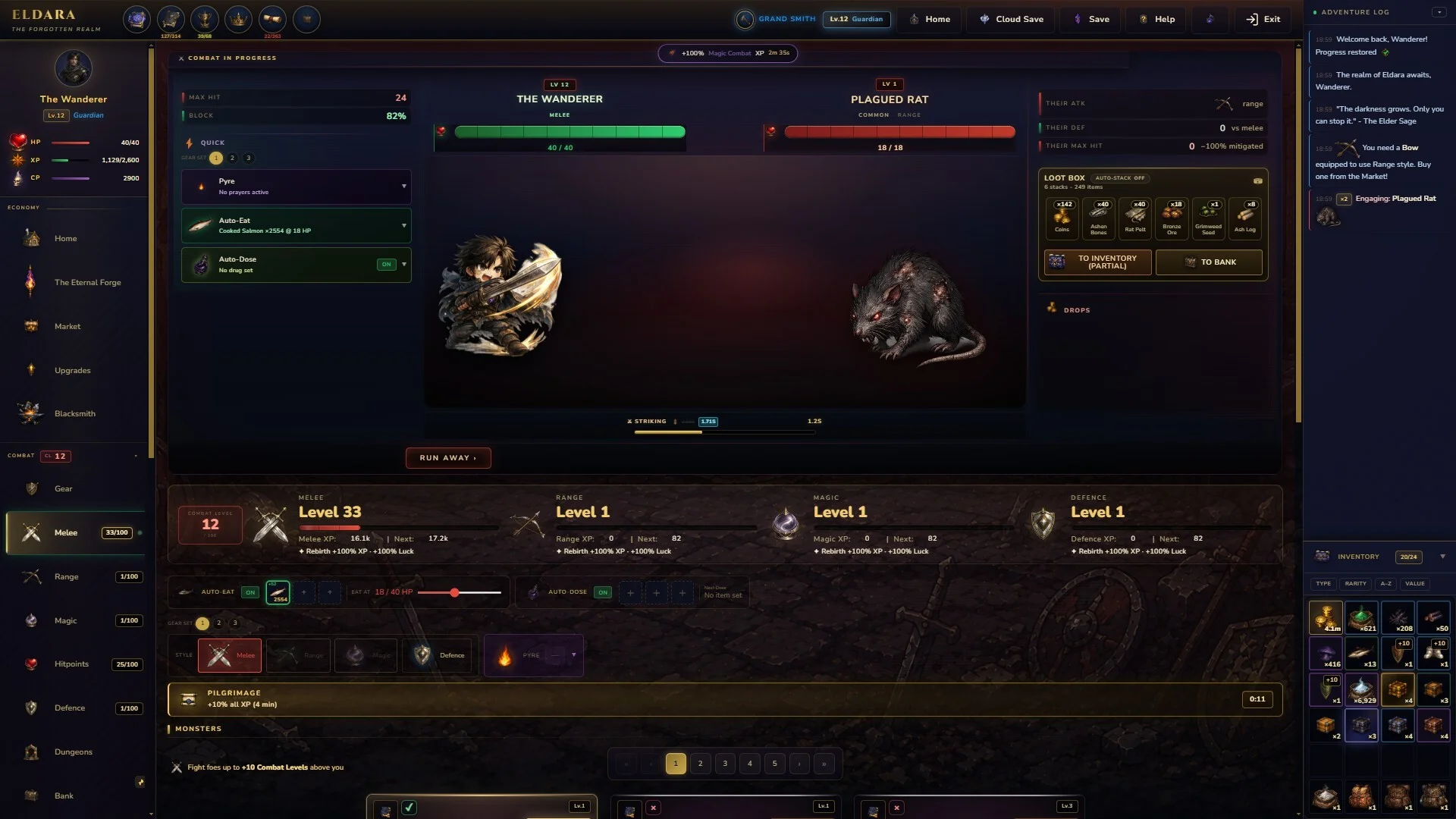
- Eldara offline progress continues while you are away from the game.
- Activity selection determines what your character works toward before you leave.
- Seventeen skills create several productive paths for training, gathering, combat, and crafting.
- Return sessions are most effective when you collect progress, review materials, and choose the next activity.
- Platform support includes Windows PC and a Steam Deck rating of Playable.
How Eldara Offline Progress Works
Eldara is designed around an idle progression loop: choose an activity, step away, and return to a character who has continued working. The official Eldara Steam page describes this as offline progress that respects your time, rather than a system built around constant attention.
The central idea is preparation. Before leaving, decide which skill or activity deserves progress next. When you return, collect the results, inspect new materials, and use those resources to improve your next action. This makes short visits useful without requiring a long continuous session.
The available systems support several types of progress. Eldara includes 17 skills, hundreds of items and recipes, crafting paths, monsters, pets, random encounters, traveling merchants, and unfolding subplots. Because the skills are described as interconnected, a productive offline choice can support more than one part of your overall development.
| Offline Element | What It Supports | Best Use |
|---|---|---|
| Activity selection | Continued progress while away | Choose a clear skill goal before exiting |
| 17 skills | Training, gathering, combat, and crafting | Focus on one bottleneck at a time |
| Crafting paths | Gear, consumables, arrows, and other items | Convert stored materials after returning |
| Pet bonuses | Permanent bonuses tied to skill domains | Match companions to your current priority |
| Random encounters | Additional world activity | Review new events during return sessions |
Treat every exit as a setup decision. Select the activity that improves your next milestone, not simply the skill with the highest current level.
Train
Build progress in combat and utility skills, including Melee and Magic.
Gather
Fish cursed waters, mine deep veins, cultivate herbs, and collect useful materials.
Craft
Turn drops and gathered resources into equipment, arrows, alchemical goods, and other items.
Hunt
Defeat monsters, gather bones and hides, and pursue materials for stronger gear.
The listing does not specify a universal maximum duration for offline accumulation. For that reason, players should avoid assuming a fixed cap, guaranteed reward rate, or exact return interval unless the game communicates it directly. The safest approach is to check the current activity and result screen after each return.
Eldara Offline Setup Before You Leave
A strong offline session begins with a quick setup routine. Eldara supports save-anytime functionality, adjustable difficulty, custom volume controls, and play at your own pace. These features make it easier to fit progress into a flexible schedule, but they do not remove the need to choose an appropriate activity.
Start by identifying the resource, skill milestone, or crafting requirement currently blocking progress. If you need materials for equipment, gathering or hunting may be more useful than starting another unrelated skill. If your next objective requires a stronger combat foundation, select a suitable training route instead.
Choose the Current Goal
Decide whether the next priority is skill training, material collection, monster hunting, crafting, or pet-related progression. Keep the goal narrow enough to evaluate when you return.
Select a Matching Activity
Set the activity that directly supports the goal. Fishing, mining, cultivation, combat training, and other skill paths can each serve different progression needs.
Check Your Available Resources
Review your inventory, recipes, equipment, and remaining materials. Avoid leaving with a plan that depends on resources you do not currently have.
Save and Exit Normally
Use Eldara’s save-anytime support and close the game through the normal process. On your next visit, confirm the result before changing activities.
| Setup Check | Why It Matters | Recommended Action |
|---|---|---|
| Current objective | Prevents unfocused progression | Name one target for the next return |
| Active skill | Determines the type of progress gained | Match the skill to your immediate bottleneck |
| Inventory space | Helps preserve useful drops and materials | Review stored items before extended away time |
| Crafting needs | Connects gathering to upgrades | Check recipes before choosing a resource activity |
| Save state | Protects the transition into away-time play | Save normally before closing |
Do not assume that every activity produces the same type of offline progress. Confirm what is active before leaving, especially when switching between training, hunting, gathering, and crafting goals.
A simple rule works well: prepare for the next action, not only the current reward. If mining supplies the materials needed at the smithy, mining may create more useful progress than repeatedly collecting a resource that is already abundant. Likewise, if a pet grants a permanent bonus to a domain, that bonus can influence which skill deserves attention next.
Skills, Crafting, and Combat Priorities
Eldara’s progression is built around 17 interconnected skills. The available description names several examples, including Melee, Magic, Fishing, Mining, Fletching, Cremation, and Cultivation. The important takeaway is not that one skill is universally best, but that each skill can feed another part of the economy.
Combat creates access to monster drops such as bones, hides, and rare materials. Gathering provides inputs for production. Crafting stations then turn those inputs into practical upgrades. Fletching supports arrow production, while alchemy and smithing provide additional ways to convert materials into progression.
| Progression Path | Main Activity | Connected Benefit |
|---|---|---|
| Melee | Train with close-range combat | Supports monster hunting and direct damage |
| Magic | Develop spell-based combat | Offers an alternative combat approach |
| Fishing | Gather from cursed waters | Adds materials through a dedicated skill route |
| Mining | Extract deep-vein resources | Feeds smithing and equipment production |
| Fletching | Create arrows and related items | Supports ranged preparation and crafting |
| Cultivation | Grow ancient herbs | Provides materials for wider production paths |
| Cremation | Process the remains of fallen beasts | Connects monster drops to a named skill system |
When returning from offline progress, sort the results into three categories:
- Immediate upgrades: Items or materials that improve your next combat or gathering action.
- Production inputs: Resources that belong in a recipe, crafting station, or future equipment path.
- Long-term assets: Pet progress, rare materials, or items that support later milestones.
The official description also lists 17 unique pets, with one associated with each mastered skill. Pets grant permanent bonuses to their domain. This makes pet collection more than a cosmetic objective: a newly unlocked companion may change the value of continuing a specific skill.
Use offline time to solve your next bottleneck. A resource is valuable when it unlocks an upgrade, recipe, pet milestone, or combat step you can use soon.
A practical return decision can follow this order:
- Check whether the completed activity produced a needed upgrade.
- Craft or equip improvements when the required materials are available.
- Identify the next missing resource.
- Choose the activity that supplies that resource.
- Leave the game only after confirming the new activity.
This loop keeps the idle system connected to active decision-making. Eldara may continue progressing while you are away, but your choices still determine whether that progress supports a clear objective.
Platform and Save Considerations
Eldara is listed as a single-player RPG, simulation, casual, adventure, and indie title. The Steam listing shows Windows 10 and Windows 11 support for 64-bit systems, while Steam Deck compatibility is marked Playable. The same listing includes Steam Cloud, which can be useful when moving between supported devices, but cloud synchronization should not be confused with offline accumulation.
| Access Detail | Officially Listed Information |
|---|---|
| Primary store listing | Steam |
| Supported operating system | Windows 10 or Windows 11, 64-bit |
| Steam Deck status | Playable |
| Game mode | Single-player |
| Cloud feature | Steam Cloud |
| Save feature | Save anytime |
| Accessibility | Adjustable difficulty, custom volume controls, no required quick-time events |
For the best offline experience, keep these concepts separate:
- Offline progress: The character continues working while you are away.
- Local saving: Your current game state is recorded through the save system.
- Steam Cloud: A synchronization feature associated with the Steam version.
- Device availability: The game must still be installed and accessible on the device where you intend to play.
If you switch between a desktop computer and Steam Deck, allow saves to synchronize before launching another session. Cloud behavior can depend on connection status and platform conditions, so verify that the latest save is available before making major changes.
The system requirements are modest. The minimum specification lists 2 GB of memory, DirectX 11, and 500 MB of available storage. The recommended specification lists 4 GB of memory, DirectX 12, and 1 GB of storage. These details matter when preparing a device for a low-maintenance idle game, particularly if you are using older hardware.
Offline progression and cloud synchronization serve different purposes. Let the game save normally, and verify the current save when changing devices.
| System Tier | Processor | Memory | Graphics and Storage |
|---|---|---|---|
| Minimum | Intel Core i3 or AMD equivalent from the last 10 years | 2 GB RAM | DirectX 11, 500 MB storage |
| Recommended | Intel Core i5 or AMD Ryzen 5 from the last 5 years | 4 GB RAM | DirectX 12, 1 GB storage |
Return Routine and Offline Checklist
The most efficient return session is deliberate but brief. First collect or inspect the completed progress. Next, compare the results with your current goal. Then convert useful materials into an upgrade, recipe, or new activity whenever possible.
Do not change activities automatically after every return. If the current route is still supplying the materials needed for a major milestone, continuing it may be better than chasing a small short-term gain. On the other hand, if the activity no longer supports your next objective, use the return point to redirect your plan.
Offline Return Checklist:
- Review the completed activity and collect available progress
- Check new materials, drops, recipes, and equipment options
- Apply useful upgrades before selecting another activity
- Compare pet bonuses with the skill you plan to train
- Set the next goal and save before leaving again
| Return Stage | Question to Ask | Result |
|---|---|---|
| Review | What did the last activity produce? | Identify usable gains |
| Upgrade | Can the materials improve gear or production? | Craft, equip, or store them |
| Redirect | What is the next missing resource? | Select a matching activity |
| Confirm | Is the intended activity active? | Verify before exiting |
| Repeat | Does the plan still support the milestone? | Continue or revise the route |
A short, focused review is usually more valuable than changing several activities without checking how each result supports your next milestone.
Eldara also includes dynamic chat events, traveling merchants, town criers, whispered subplots, and shadowy strangers. These elements mean that a return session is not only about numerical progress. Check the world for new conversations, encounters, or offers before leaving again, particularly after a longer break.
The game’s one-time purchase model and stated absence of microtransactions are also relevant to the offline loop. Progress is presented as a long-term personal climb rather than a system built around subscriptions, timers behind paywalls, or pay-to-win advantages. Even so, players should focus on the mechanics confirmed in the current game build and avoid assuming that every future update will preserve identical behavior.
Eldara Offline FAQ
Q: Does Eldara support offline progress?
Yes. Eldara is described as an idle game with offline progress, allowing an active activity to continue while you are away. The listing does not specify a universal offline duration or exact reward cap.
Q: What should I do before leaving Eldara?
Choose one clear goal, select a matching activity, review your inventory and crafting needs, then save and exit normally. This makes the next return easier to evaluate.
Q: Which Eldara skills are useful for offline progression?
The game includes 17 interconnected skills. Melee, Magic, Fishing, Mining, Fletching, Cremation, and Cultivation are among the named examples, and the best choice depends on your current resource or upgrade bottleneck.
Q: Can I play Eldara on Steam Deck?
The Steam listing marks Eldara as Playable on Steam Deck. It also lists Windows 10 and Windows 11 64-bit support, single-player functionality, Steam Cloud, and save-anytime support.
The strongest Eldara offline routine is simple: choose a goal, assign the right activity, return to process the results, and repeat with a clearer next step.