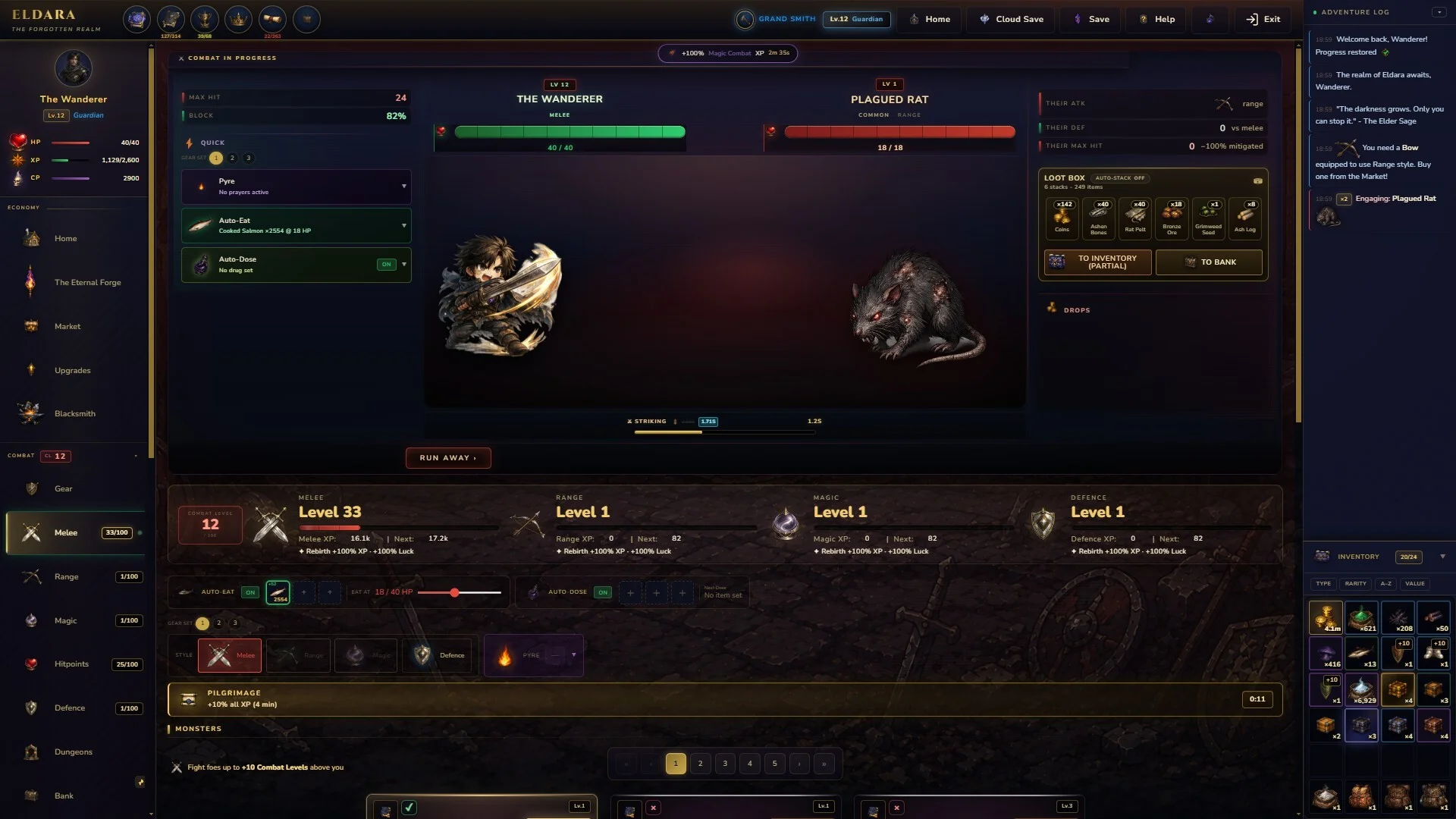
- Eldara download: The official PC version is available through the Eldara Steam store page.
- Release status: Eldara reached Version 1.0 on September 2, 2026 after Early Access.
- Purchase model: The game uses a one-time purchase model with no microtransactions listed.
- System check: Windows 10 64-bit, 2 GB RAM, DirectX 11, and 500 MB storage are minimum requirements.
- Gameplay focus: Train 17 skills, collect 17 pets, craft equipment, and progress through offline gains.
Eldara download: Official Access and Release Status
The safest way to start the Eldara download is through the official Eldara Steam store page. Eldara is a dark fantasy idle RPG developed and published by Eldara Games. The Steam listing identifies the game as a single-player title with RPG, adventure, casual, indie, and simulation elements.
Eldara entered Early Access on June 15, 2026, then launched Version 1.0 on September 2, 2026. This makes the current Steam listing the appropriate destination for purchasing, installing, and receiving the released PC build.
| Access Detail | Information |
|---|---|
| Official platform | Steam for PC |
| Developer | Eldara Games |
| Publisher | Eldara Games |
| Version 1.0 release | September 2, 2026 |
| Early Access release | June 15, 2026 |
| Game mode | Single-player |
| Steam Deck status | Playable |
Avoid unofficial download mirrors and modified installers. The Steam page provides the recognized Eldara build, purchase options, updates, achievements, cloud support, and installation management in one place.
Official Store
Open the Eldara Steam page to review the current listing and access the PC installation.
Version 1.0
The released build launched on September 2, 2026, following the Early Access period.
Single-Player
Eldara is designed around personal progression rather than competitive multiplayer access.
Steam Features
The listing includes Steam Achievements, Steam Cloud, Family Sharing, and Steam Deck compatibility.
How to Install Eldara on PC
The installation process follows the normal Steam workflow. Before starting, confirm that you are using the official Eldara listing and that your computer has enough free storage for the installation and later save data.
Open the Official Store Page
Visit the Eldara Steam page and verify that the page identifies Eldara Games as both developer and publisher.
Sign In to Steam
Sign in to your Steam account through the desktop client or supported web flow. A Steam account is required to purchase and manage the installation.
Purchase Eldara
Review the displayed regional price and introductory offer before completing checkout. The listed introductory offer is shown as ending on September 16, 2026.
Install the Game
Open your Steam Library, select Eldara, choose the installation command, and select a drive with at least the required free space.
At the time of writing, the Steam listing shows an introductory price of $5.25, reduced from $7.50. Prices can vary by region and may change when the introductory offer ends, so verify the final amount on Steam before purchase.
| Purchase Item | Listed Information |
|---|---|
| Standard listed price | $7.50 |
| Introductory price | $5.25 |
| Discount shown | 30% |
| Offer end date | September 16, 2026 |
| Payment model | One-time purchase |
| Microtransactions | None listed in the game description |
Steam may display regional pricing, taxes, or a different offer depending on your account location. Treat the store checkout total as the current price instead of relying on an older screenshot or search result.
Eldara System Requirements and Setup Checks
Eldara is presented as an idle RPG with modest storage requirements, but the recommended setup is stronger than the minimum configuration. The minimum specification calls for a 64-bit processor and operating system, Windows 10 64-bit, 2 GB of memory, DirectX 11, and 500 MB of available storage.
The recommended profile raises memory to 4 GB, suggests an Intel Core i5 or AMD Ryzen 5 processor from the last five years, and lists either a dedicated graphics card or a modern integrated GPU using DirectX 12.
| Component | Minimum | Recommended |
|---|---|---|
| Operating system | Windows 10 64-bit | Windows 10 or 11 64-bit |
| Processor | Intel Core i3 or AMD equivalent | Intel Core i5 or AMD Ryzen 5 |
| Memory | 2 GB RAM | 4 GB RAM |
| Graphics | Not specified | Dedicated GPU or modern integrated graphics |
| DirectX | Version 11 | Version 12 |
| Storage | 500 MB | 1 GB |
| Sound | DirectSound-compatible card | DirectSound-compatible card |
Before You Install:
- Confirm that your PC runs a 64-bit version of Windows 10 or Windows 11
- Keep at least 500 MB free for the minimum installation requirement
- Update Steam and select a reliable library drive
- Check that your graphics hardware supports the listed DirectX version
- Keep the Steam Cloud option available if you use multiple supported devices
A computer that meets the minimum specification may be suitable for starting Eldara, while the recommended profile offers more headroom for general system activity. Close unnecessary applications if the Steam client or game struggles during installation or launch.
The listed requirement is 500 MB minimum and 1 GB recommended. Reserve additional space for temporary installation files, patches, and local save management.
What to Expect After the Eldara Download
Eldara centers on long-term progression in a dark fantasy realm. Its core loop combines active play with idle advancement, allowing selected activities to continue progressing while you are away. The game description emphasizes training, hunting, gathering, crafting, companions, and exploration rather than a conventional multiplayer campaign.
The progression system contains 17 interconnected skills. Examples listed by the developer include Melee, Magic, Fishing, Mining, Fletching, Cremation, and Herblore-style cultivation. These activities feed into a broader economy in which materials can support equipment, recipes, and future upgrades.
| Progression Area | Function |
|---|---|
| Skills | Train 17 skills with individual passives and milestones |
| Hunting | Defeat monsters and collect bones, hides, and materials |
| Crafting | Use gathered resources for gear, recipes, and upgrades |
| Pets | Collect 17 companions with permanent domain bonuses |
| World events | Encounter merchants, town criers, subplots, and strangers |
| Offline progress | Continue selected activities while away from the game |
After installation, choose an activity that supports your current objective. Combat can provide materials for equipment, while gathering and crafting help establish a sustainable progression loop. Because each skill contributes to another part of the economy, spreading attention across complementary activities is a practical way to build momentum.
Skill Training
Build progress across 17 skills, from combat-focused activities to gathering and production.
Monster Hunts
Explore crumbling kingdoms and forgotten ruins while collecting materials from defeated creatures.
Companion Bonuses
Unlock 17 unique pets, each connected to a skill and its permanent domain bonus.
The game also includes random encounters, traveling merchants, chat events, and unfolding subplots. These systems give the idle progression loop additional context and create reasons to return after assigning an activity.
Start with a clear activity goal, then select skills that support it. For example, gathering can prepare materials for crafting, while combat can supply drops for equipment upgrades.
Features, Accessibility, and FAQ
The Steam listing reports 68 Steam Achievements, Steam Cloud support, Family Sharing, and a Playable rating for Steam Deck. Eldara also lists accessibility options intended to support flexible play, including adjustable difficulty, save-anytime functionality, custom volume controls, no quick-time-event requirement, and a pace that accommodates players who prefer less time pressure.
The listed language support includes English interface and subtitles. Full audio is not listed for English in the available store information.
| Feature Category | Listed Support |
|---|---|
| Achievements | 68 Steam Achievements |
| Save options | Save anytime |
| Difficulty | Adjustable difficulty |
| Audio | Custom volume controls |
| Input and timing | Playable without quick-time events |
| Language | English interface and subtitles |
| Device compatibility | Steam Deck listed as Playable |
The store disclosure also states that some visual assets, including monster portraits, pet illustrations, item icons, and character artwork, were created with AI image-generation tools. It specifies that no live AI generation, AI dialogue, or AI-driven content is used during gameplay.
Q: Where can I get the Eldara download?
Use the official Eldara Steam store page at https://store.steampowered.com/app/4746070/Eldara/. It is the recognized PC distribution page for purchasing and installing the game.
Q: Is Eldara free to download?
The Steam listing presents Eldara as a paid one-time purchase rather than a free-to-play title. The displayed introductory price is $5.25, reduced from $7.50.
Q: What are Eldara's minimum PC requirements?
The minimum requirements are Windows 10 64-bit, a 64-bit Intel Core i3 or AMD-equivalent processor, 2 GB RAM, DirectX 11, and 500 MB of available storage.
Q: Does Eldara support offline progress?
Yes. Eldara's store description includes offline progress, allowing selected activities to continue while you are away and supporting a flexible idle-RPG playstyle.
Review the store page, system requirements, and current checkout price together before beginning the installation. This avoids confusion caused by changing regional offers or outdated listings.