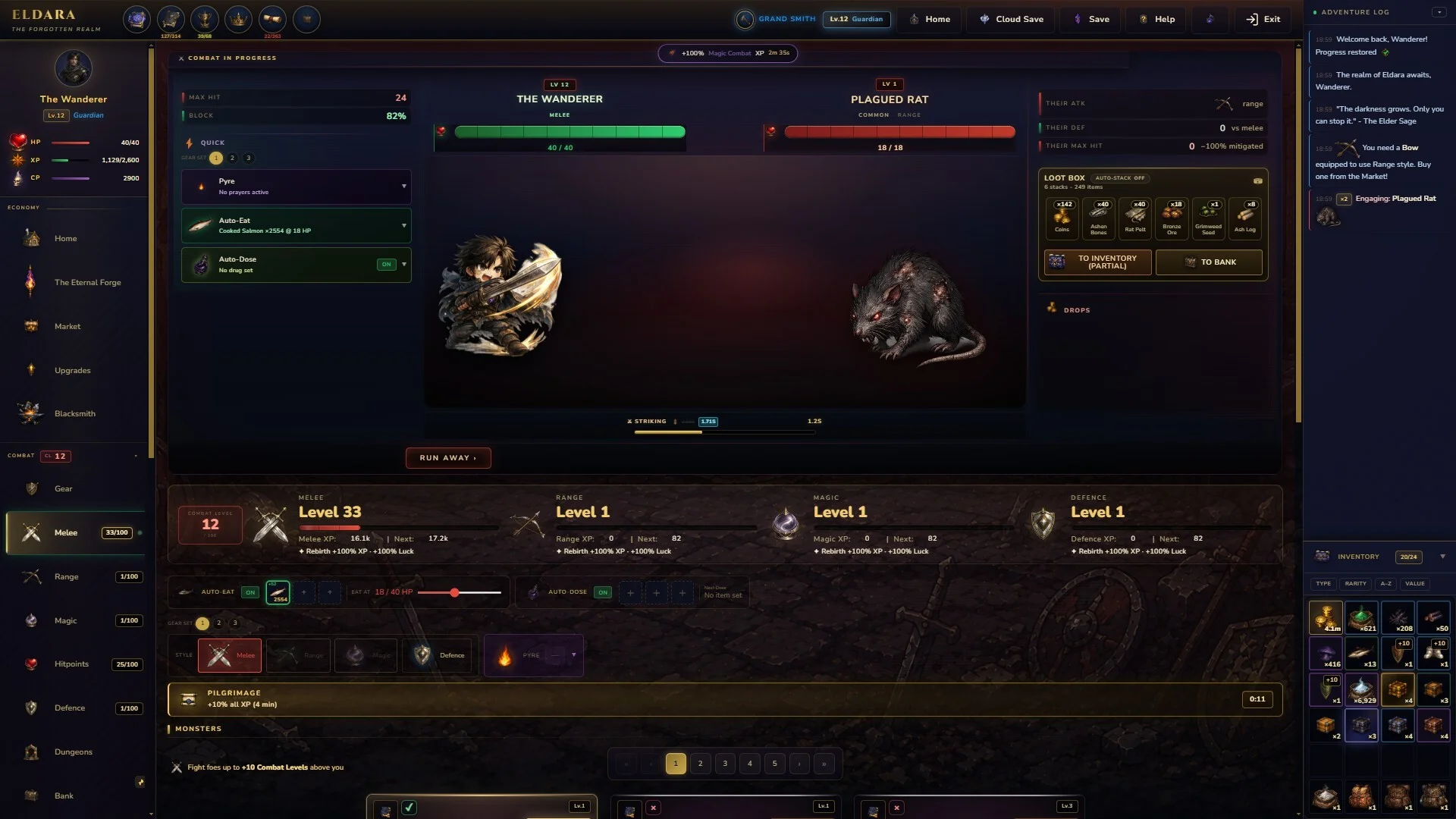
- Eldara how to sell: Open the Market menu to begin managing items for sale.
- Inventory action: Right-click the gear or item you want to sell.
- Gold return: Use the available vendor or sell command to convert unwanted items.
- Safety check: Review the selected item before confirming any transaction.
- Best habit: Keep useful upgrades and sell only items you no longer need.
Eldara How to Sell Extra Items
The basic Eldara how to sell process uses two interface areas: the Market menu and your inventory. Open Market, locate the item you want to remove, and right-click it. This is the key interaction for selling extra gear or items for gold.
The current documented control flow is short, but the decision before selling still matters. Equipment may be useful for another build, a future upgrade, or a different character setup. Treat selling as an inventory-management choice rather than an automatic cleanup action.
| Action | Where to perform it | Result |
|---|---|---|
| Open Market | Main game interface | Displays the relevant market controls |
| Find an item | Inventory view | Selects gear or another stored item |
| Right-click the item | Inventory slot | Opens the available item action |
| Choose the sell command | Item action menu | Sends the item through the vendor flow |
| Review the transaction | Confirmation or market panel | Helps prevent accidental sales |
Market Menu
- Starting point for the transaction
- Open it before selecting inventory items
- Use it whenever you need to manage sellable goods
Inventory Item
- Select the exact gear or item
- Check whether it is still useful
- Avoid rushing through similar-looking drops
Gold Management
- Selling creates room in your inventory
- The transaction is intended to return gold
- Prioritize items with no planned use
If you are searching for the vendor control, do not begin from a random inventory shortcut. Open Market first, then right-click the item you want to process.
The most important detail is the order of operations. Opening the correct menu first makes the sell interaction easier to find and reduces confusion when the standard inventory view does not display the expected command.
Step-by-Step Selling Walkthrough
Follow these steps whenever you need to sell spare gear or items in Eldara. The method is designed for inventory cleanup and gold recovery while keeping the selection process deliberate.
Open the Market Menu
Enter the Market interface from the main game UI. This is the documented starting point for vending unwanted gear or items.
Open Your Inventory
Locate the inventory section that contains the item you want to sell. Compare similar items carefully before selecting one.
Right-Click the Item
Right-click the chosen gear or item. This should reveal the available action associated with that item in the Market interface.
Select the Sell or Vendor Action
Choose the available command that sends the item to the vendor flow. Read the action label before proceeding.
Check the Result
Confirm that the intended item was processed and that your inventory and gold totals reflect the transaction.
| Step | Player input | What to verify |
|---|---|---|
| 1 | Open Market | You are using the correct interface |
| 2 | View inventory | The target item is visible |
| 3 | Right-click item | The item action menu appears |
| 4 | Select vendor action | The action applies to the intended item |
| 5 | Review result | Item removal and gold change look correct |
A sale is complete only after you verify the selected item, the action result, and your updated inventory. This quick review is especially useful when several drops have similar names or icons.
If the action does not appear immediately, repeat the sequence from the Market menu rather than repeatedly clicking the item in another interface. The documented solution specifically depends on opening Market and then right-clicking the inventory item.
Use the same process for gear and ordinary items, but apply a stricter review to equipment. A low-level weapon may still be relevant if you are testing a different setup, while a duplicate or clearly unwanted item is usually a safer candidate.
What to Sell and What to Keep
The sell command is simple; deciding what belongs in the sell pile requires more judgment. Before converting an item into gold, inspect its role in your current progression and consider whether it could support another loadout.
There is no need to sell every item immediately. A small reserve of useful equipment can be more valuable than a slightly larger short-term gold balance, particularly when you are still comparing gear.
Keep
Gear that is stronger than your current item or may support a planned setup.
Review
Items with unclear value, unfamiliar effects, or a similar version already equipped.
Sell First
Duplicates, outdated gear, and items with no apparent use in your current plans.
Avoid Rushing
Do not bulk-select items until you have checked their names, icons, and purpose.
| Item situation | Recommended action | Reason |
|---|---|---|
| Clear duplicate | Sell after checking both items | Keeps the stronger or more useful copy |
| Outdated gear | Review, then sell | Frees inventory space without sacrificing a likely upgrade |
| Unfamiliar item | Keep temporarily | Allows time to understand its purpose |
| Possible build option | Keep or mark for review | Preserves flexibility for future testing |
| Unwanted low-value drop | Sell through Market | Converts clutter into gold |
Do not rely only on an item’s appearance or position in the inventory. Compare similar gear and make sure the selected item is not the version you intended to keep.
A practical approach is to divide your inventory into three groups:
- Keep now: Items currently equipped or clearly better than your alternatives.
- Review later: Unfamiliar items or gear that may fit another setup.
- Sell: Duplicates and outdated items with no planned purpose.
This system prevents the common mistake of treating all extra inventory as worthless. It also makes future Market visits faster because your sell candidates are already separated mentally before you open the item action menu.
Market Routine for Cleaner Inventory
A consistent Market routine makes selling less error-prone. Instead of opening the interface after every individual drop, you can review your inventory at sensible checkpoints and process only the items that have already been evaluated.
Use this routine after collecting several items, changing equipment, or finishing a progression session. The goal is not to maximize the number of sales; it is to maintain enough space and gold without discarding useful options.
Before You Sell:
- Open the Market menu before selecting an item
- Compare duplicate or similar gear
- Move unfamiliar items into a review group
- Right-click only the intended inventory item
- Verify the inventory and gold result afterward
| Routine point | Recommended timing | Benefit |
|---|---|---|
| First review | After several new drops | Prevents inventory clutter |
| Equipment review | After changing gear | Identifies outdated replacements |
| Market visit | At a natural pause | Reduces rushed decisions |
| Final check | Immediately after selling | Confirms the intended result |
Batching your review can save time, but batching your decisions is risky. Evaluate items together, then process each sell action carefully through Market.
The best routine separates evaluation from execution. First decide which items belong in the sell group. Then open Market, right-click each selected item, and check the result as you go. This keeps a fast workflow while preserving control over individual transactions.
For players learning the interface, avoid assuming that a standard left-click will open the correct command. The documented control is a right-click from the Market-related inventory view. If the menu looks different, return to Market and repeat the sequence from there.
For the latest player discussion covering this control, see the Eldara Steam discussion about selling extra gear and items.
Selling Troubleshooting and FAQ
Most selling questions come from opening the wrong interface, selecting the wrong inventory item, or failing to verify the result. Use the checks below before assuming that an item cannot be sold.
| Problem | Likely cause | Recommended check |
|---|---|---|
| No sell action appears | Market was not opened first | Return to Market and select the item there |
| Wrong item is selected | Similar icons or names | Compare the item carefully before right-clicking |
| Inventory feels unchanged | Result was not reviewed | Check the item list after the transaction |
| Unsure whether to sell | Item value is unclear | Keep it temporarily and review its future use |
| Gold seems unexpected | Different item was processed | Recheck the selected item and transaction result |
Check the interface first, the selected item second, and the transaction result third. This order isolates most selling mistakes without unnecessary menu changes.
Q: How do I sell items in Eldara?
Open the Market menu, locate the item in your inventory, and right-click it. Use the available sell or vendor action, then verify the result.
Q: Can I sell extra gear for gold?
Yes. The documented Market interaction is intended for vending extra gear and items in exchange for gold.
Q: Why can’t I find the sell option?
Make sure you opened Market before interacting with the inventory item. The documented method is to right-click the item from that interface.
Q: Should I sell every item I do not currently use?
No. Keep unfamiliar items and possible upgrades until you understand their purpose. Sell clear duplicates, outdated gear, and items with no planned use.
The central answer remains simple: open Market, right-click the inventory item, and use the available vendor action. The extra steps in this guide are there to protect useful gear, reduce inventory mistakes, and make the process easier to repeat.